Quick Summary:
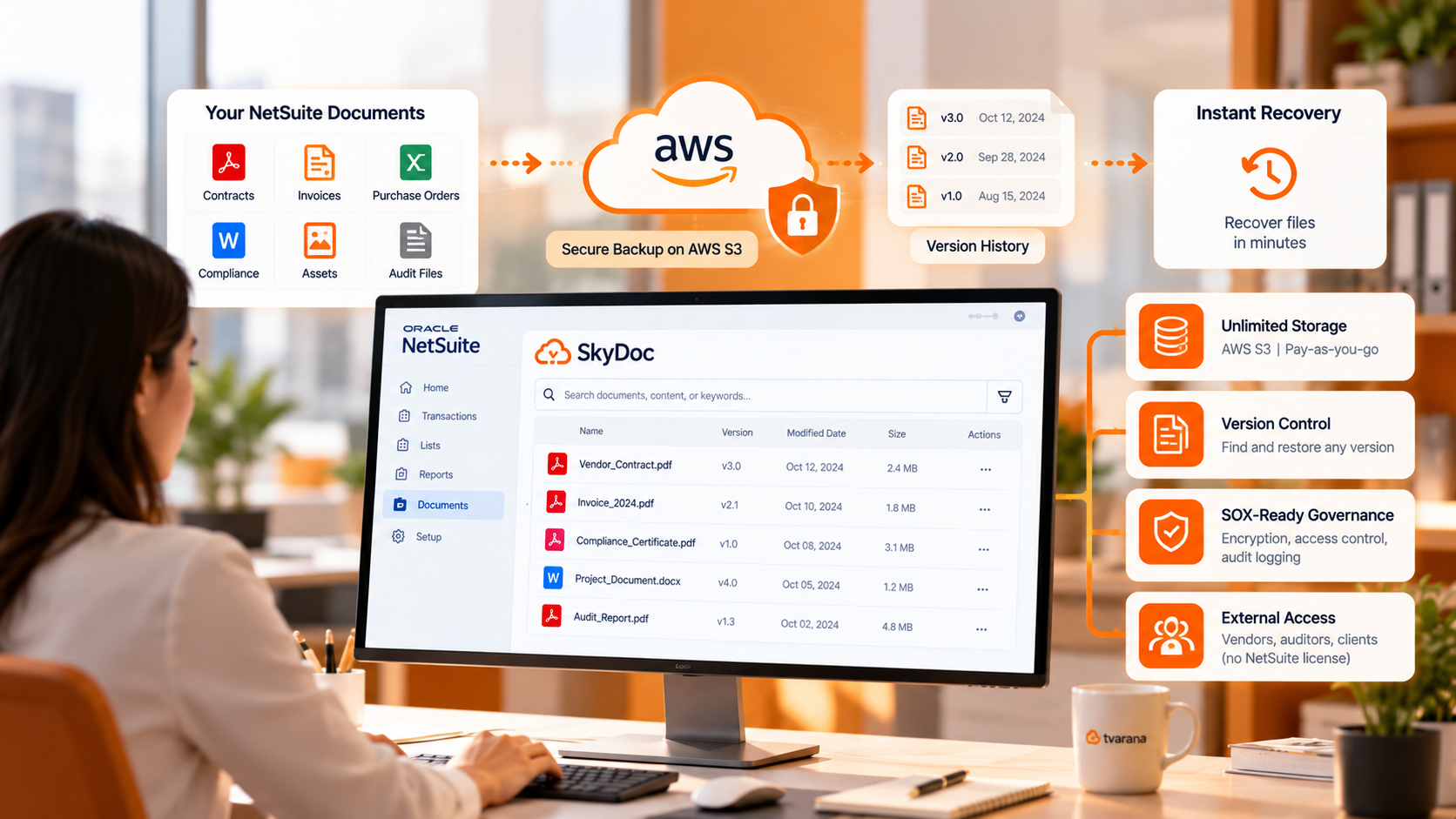
NetSuite document backup and recovery is only as strong as the layer beneath the File Cabinet. Cloud ERP protects against hardware failure, but not against the everyday events that actually take documents offline: a file deleted, overwritten, or locked behind a bad permission. SkyDoc by Tvarana closes that gap, storing documents on AWS S3 with version history, restore, SOX-ready governance, and external access, so a missing file is recovered in minutes from inside NetSuite rather than through an IT ticket.
Quick Takes:
Your business runs on documents. Contracts, invoices, vendor agreements, purchase orders, compliance documents, and audit files constitute the foundation of every department's operations. The impact spreads quickly when those files are unavailable, even for an hour. Finance cannot close the month. Procurement cannot approve vendors. Legal cannot retrieve signed agreements. Compliance cannot produce audit evidence.
This is the reality organizations face when their NetSuite document backup and recovery strategy is underpowered. And for many businesses still relying on the native NetSuite File Cabinet as their primary document infrastructure, that moment of failure is not a matter of if, it is when.
Many organizations assume that moving to a cloud ERP like NetSuite eliminates document risk. That assumption is dangerous. Cloud platforms protect against infrastructure failures. They do not protect you from:
Any of these events may cause the whole organization to stop running if you don't have an established NetSuite document backup and recovery strategy. These risks are contained by a structured disaster recovery plan, one that ensures recovery takes minutes instead of days when disruption hits.
NetSuite's native File Cabinet is functional for basic storage. For growing enterprises, it starts showing limitations quickly.
No SOX Compliance Out of the Box: The File Cabinet is not natively SOX compliant. This is not a small flaw for companies with regulatory responsibilities in manufacturing, healthcare, or finance. Rather, it is an audit risk.
No Document Versioning: A new file version replaces the old one when it is uploaded to the File Cabinet. Version history is erased. Recovery means starting again rather than rolling back if a team member files the wrong version of the contract.
No Document Approval Workflows: There is no built-in approval system in the File Cabinet. Visibility gaps and compliance exposure result from documents passing through manual procedures and email chains.
Storage Constraints That Scale Poorly: File Cabinet storage is tied to your NetSuite subscription tier. As document volumes grow (such as high-resolution media, transaction attachments, and compliance archives), storage costs rise and operational friction increases.
No External Collaboration: By default, only licensed NetSuite users can access File Cabinet documents. External vendors, auditors, legal teams, and consultants cannot view or upload files without a NetSuite license, limiting collaboration and slowing operations.
These are not edge-case limitations. They are structural gaps that directly affect NetSuite document backup and recovery readiness, especially in high-stakes operational moments.
SkyDoc by Tvarana is a native NetSuite SuiteApp designed to address exactly these gaps. It extends NetSuite's document infrastructure with enterprise-grade cloud storage, governance tools, and collaboration capabilities, all without leaving the NetSuite environment.
Where the File Cabinet stores files, SkyDoc protects them.
SkyDoc's primary storage backbone is Amazon Web Services S3, one of the most durable cloud storage architectures available. AWS S3 provides:
Because files live on AWS S3, document retrieval is independent of both internal server capacity and NetSuite subscription constraints. Files are available when they are needed, regardless of volume.
One clarification on what this protects, because it's easy to conflate: 11-nines durability means AWS will not lose your stored files to hardware failure. It is SkyDoc's version history, restore, and access controls not raw durability that bring a file back after someone deletes it, overwrites it, or locks it behind a wrong permission. The two work together: the infrastructure keeps the file safe, and SkyDoc's governance layer makes the right version recoverable.
Consider a common operational scenario: A finance team is mid-audit when a key vendor contract becomes inaccessible due to a permission misconfiguration. With the File Cabinet, recovery requires IT intervention, ticket escalation, and manual restoration, a process that can take hours.
With SkyDoc-powered NetSuite document backup and recovery, the same scenario resolves in minutes. The document remains stored on AWS S3 and accessible through SkyDoc's centralized interface with version history intact. So the correct file can be retrieved and shared with the auditor without leaving NetSuite.
The operational impact of faster recovery extends across every department:
SkyDoc's compliance architecture is one of its most significant differentiators. While the File Cabinet is not natively SOX compliant, SkyDoc is built to support SOX compliance, with the encryption, access control, and audit logging that regulated industries require.
This means NetSuite document backup and recovery is not just about getting files back. It is about getting them back in a way that satisfies regulators, auditors, and internal governance requirements.
Additional governance features include:
One of the most overlooked aspects of NetSuite document backup and recovery planning is external collaboration. When documents need to be shared with vendors, auditors, or clients, teams often resort to email attachments, shared drives, or consumer file-sharing tools, all of which create visibility gaps and security risks.
SkyDoc solves this natively. External users, with no NetSuite license required, can view, upload, and collaborate on documents through a secure portal. SkyDoc's external collaboration capabilities mean that sharing documents with outside stakeholders does not require compromising your document governance model.
Unlimited free internal users also means collaboration inside your organization scales without licensing friction.
Strong NetSuite document backup and recovery is not a one-time configuration; it is the foundation of a broader NetSuite data management strategy. Organizations that treat document infrastructure as a strategic asset see compounding benefits: faster audits, cleaner compliance cycles, reduced IT overhead, and better cross-department visibility.
SkyDoc's ability to move and copy documents across NetSuite transactions, attach files to custom records, and integrate with third-party systems makes it a true enterprise document management services, not just a storage upgrade.
Every gap in this table is a potential point of failure during a document recovery event. SkyDoc closes them.
The question is not whether your organization will face a document disruption. The question is how fast you can recover when it happens. NetSuite document backup and recovery built on the File Cabinet alone leaves too many gaps: no versioning, no SOX compliance, no external collaboration, and storage constraints that grow more limiting as your business scales. For organizations that cannot afford document downtime, that is an unacceptable risk.
SkyDoc by Tvarana closes those gaps with AWS S3 cloud infrastructure, enterprise governance capabilities, and native NetSuite integration that requires no workflow disruption to implement. Recovery in minutes is not aspirational. With the right NetSuite document backup and recovery architecture, it is an operational standard.
Talk to Tvarana's NetSuite team today to assess your current document recovery readiness and build a resilient document strategy that scales with your business.



Tvarana is an award-winning
Oracle NetSuite Consulting Firm
and an SDN partner.
info@tvarana.com